How can I make AI people that look real?
Write the portrait as a photograph, not as a person: age, skin, marks, hair, clothes, where the light comes from, which lens. Generate it. Then make one targeted edit that strips the styling — gloss, heavy makeup, salon hair — while naming everything that must stay exactly as it is. Two generations, 8.5 credits.
 Open PromptWise to follow along (opens in a new tab)
Affiliate link — we earn a commission if you subscribe, at no extra cost to you.
What do you need before you start?
- An AI image tool that can generate a portrait and then edit it
- Fifteen minutes, most of it spent looking closely at the first result
No reference photo, no camera, no model release. Everything here starts from words.
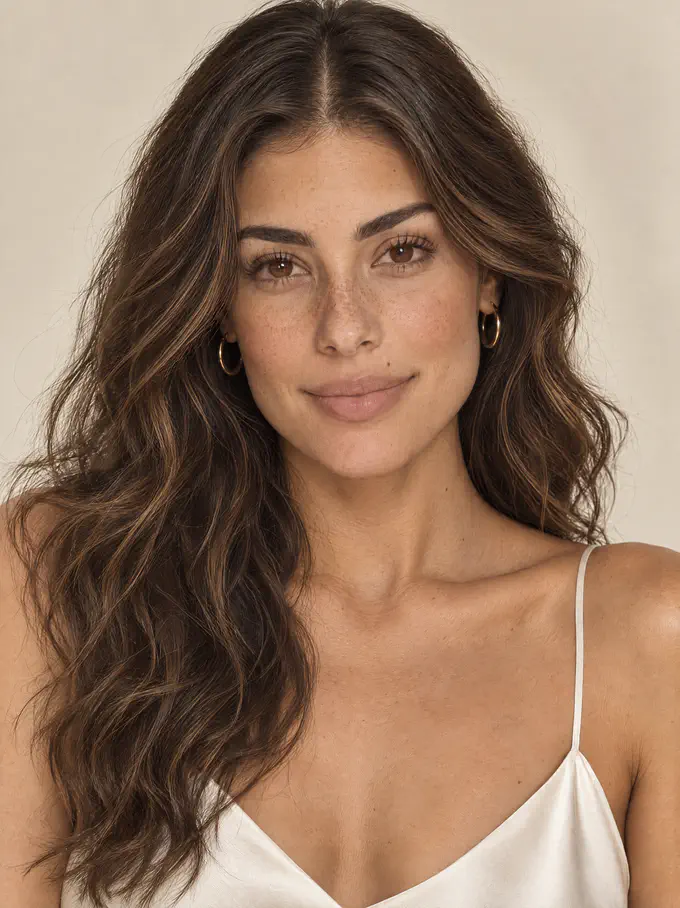
This is Mira. She is the face of Idrelle, a fragrance brand we invented so we can show you the whole process without a client's product in it. She was made in two generations from two prompts, both printed in full below. Our models and demo brands are AI-generated and fictional. Every AI-generated image is labeled. Mira is not a real person.
Why do AI people look fake?
Not for the reason most people assume. The skin is usually fine — these models render pores and freckles well when you ask for them. What gives an AI person away is almost always one of three things:
Flat light. Real faces are lit from somewhere. Light arrives from a direction, lands on one side and leaves a shadow on the other. Flat, even, shadowless light is the single most common tell, and it's what most models default to when you don't specify.
Styling with no wear. Glass-smooth hair with no stray strands, a lip with a perfect wet shine, skin with a highlight exactly where a makeup artist would put it. Each one is plausible alone. Together they read as a render.
Nothing specific. A face with no freckle, no asymmetry, no mark anywhere becomes what we call AI pretty: beautiful, forgettable, and obviously generated. Real faces have something you'd describe if you were describing that person.
The method below fixes all three, in that order.
How do you make it, step by step?
-
Write the portrait as a photograph
Eight things. The first generation gets the picture you're imagining; the second one makes it believable. Don't try to do both at once — there's a section below explaining why that fails.
What to specify Why it matters From our prompt Framing and expression Decides the kind of photograph before anything else Head and shoulders, front-facing, serene, soft closed-mouth smile Age, skin, marks The marks are what make a face a person rather than a type Late twenties, warm olive skin, freckles across nose and cheekbones, small beauty mark above the upper lip Face features Keeps the model from drifting to a generic average Defined cheekbones, full brows brushed upward, almond-shaped soft brown eyes Makeup The biggest lever on how retouched she looks Polished no-makeup makeup, dewy, sheer nude-rose lip Hair Texture, not just color — this is where "wig" happens Espresso-brown with caramel highlights, glossy brushed-out waves, center part Jewelry and clothing Small, specific objects anchor the image in the real world Fine gold hoops, ivory silk camisole with thin straps Background and light Direction and quality, named separately Warm ivory seamless backdrop, soft diffused light, gentle warm fill Camera and intent Tells it what kind of picture this is 85mm lens, photorealistic, refined and understated Here is the prompt that made the first image, exactly as we ran it:
PROMPT
High-end beauty campaign portrait, head and shoulders, front-facing, looking directly at camera with a serene, poised expression and a soft closed-mouth smile. An original Luxury lifestyle influencer woman in her late twenties with sun-kissed warm olive skin, a fresh, youthful complexion, light freckles across her nose and cheekbones, and a small beauty mark above her upper lip. Luminous, even skin with Subtle skin texture detail, Soft natural blush tones. Defined cheekbones, groomed full brows brushed upward, almond-shaped soft brown eyes. Polished no-makeup makeup: dewy skin, a subtle luminous highlight on the cheekbones, softly defined lashes, a sheer nude-rose lip. Rich espresso-brown hair with subtle sun-kissed caramel highlights, in glossy, soft brushed-out waves with a clean center part, healthy shine, no frizz. Delicate fine gold hoop earrings. Ivory silk camisole with thin straps. Warm ivory seamless backdrop, soft diffused beauty lighting from a large overhead softbox, gentle warm fill, 85mm lens, photorealistic, refined and understated luxury.
Swap the highlighted parts for your own character. The structure stays.
One word doing more work than it looks like it is: original. It tells the model you want a person who doesn't exist, rather than a face assembled from someone recognizable. Keep it in.
-
Generate at the highest resolution you have
Pores don't exist at low resolution. The texture that makes a face read as photographic is made of detail a few pixels wide, and it is the first thing a smaller setting throws away. Generate big once rather than upscaling later.
Setting What we used How to choose yours Model Nano Banana Pro Strong on single high-resolution photographs from one prompt Aspect ratio 3:4 3:4 for the feed, 9:16 for reels and stories, 2:3 for a wider editorial crop Resolution 4K Always the highest available when there's a person in the frame. This is not the place to economize Number of images 1 Generate 2 or more if you can. The first face is rarely the one you keep That run cost 4 credits.
-
Judge it at full size, not at thumbnail size
Everything looks real small. Open the image at 100% and work through the face in order. This takes two minutes and saves you from publishing something that falls apart the moment anyone looks properly.
- Marks. Are the freckles there, or did they get smoothed away? Is the beauty mark where you asked for it?
- Skin. Pores visible on the forehead, nose and cheek? Real skin has tonal variation and a slight shine somewhere. Uniform matte skin across the whole face is a render.
- Eyes. Lower lashes present, not just upper. Catchlights in both eyes, coming from the same direction.
- Hair. Any loose strands at the crown and temples, or does it sit like a helmet?
- Light. Can you point at where it's coming from? If you can't, neither can the viewer, and that's the flatness problem.
- Color. Whites that are actually white. A yellow or sepia cast is common after an edit and is easy to miss on a warm background.
- Anything extra. Moles, marks or jewelry you didn't ask for. If it isn't in your description, it doesn't belong to your character.
Our first image passed most of this. The skin had real pores. What it failed on was the styling — the hair was a salon blowout, the lip had a wet shine, and there was a bright highlight sitting on each cheekbone. Every one of those is something a person would have had done to them an hour before the photo. Together they made her look produced rather than photographed.
-
Change one thing and name everything that stays
Here is the rule that matters more than any prompt on this page:
Every AI edit redraws every pixel. There is no "just change the lip". The model regenerates the whole image and tries to land close to the original. Faces drift, skin smooths, eye color shifts. So you state, explicitly, everything that must not move — and then ask for the one thing that must.
PROMPT
Edit the image. Keep her face shape, bone structure, eye color, earrings, and the warm neutral backdrop exactly the same. Reduce the gloss and shine in her hair — give it a natural, air-dried, slightly undone beachy texture instead of a smooth salon blowout, same length and center part. Reduce the makeup: a bare tinted lip instead of gloss, remove the heavy cheekbone highlight, bring back more visible natural freckles and skin texture across the nose and cheeks instead of the smoothed finish. Keep the same warm, soft directional lighting.
Count the locks: face shape, bone structure, eye color, earrings, backdrop, hair length, center part, lighting. Eight things held in place so that four things could change. That ratio is normal. An edit prompt that only says what you want changed is how you lose the face you liked.
That run cost 4.5 credits, on a different model — ChatGPT 2.5 Sunburst, which handles this kind of instructed edit well.
What actually changed
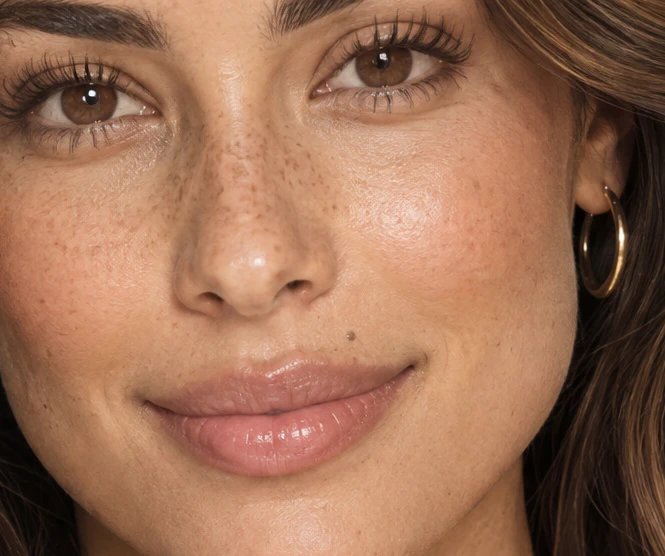
AI-GENERATED First generation 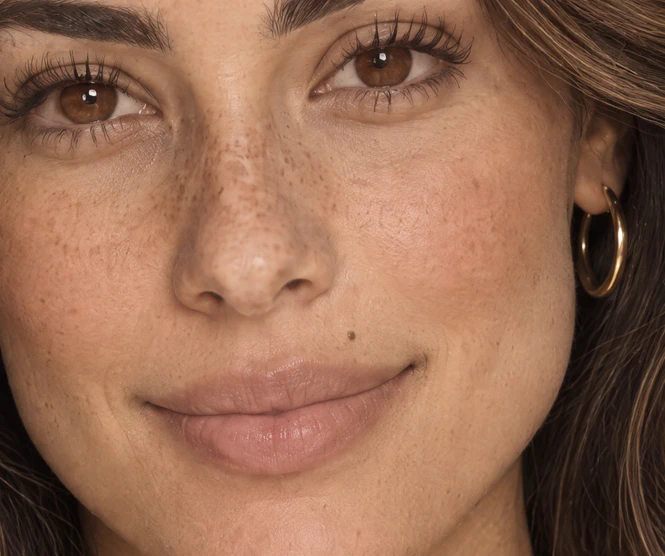
AI-GENERATED After the edit Look at these two before you believe anyone's claims about AI skin, including ours. The honest summary:
- The lip. Gloss to bare, with visible lip lines. This is the single most visible change, and the one doing most of the work.
- The highlight. Gone from the cheekbones. Skin reads as skin instead of as makeup.
- The freckles. More of them, and spread further — under the eye, out toward the temple, rather than clustered on the nose.
- The finish. Dewy to matte.
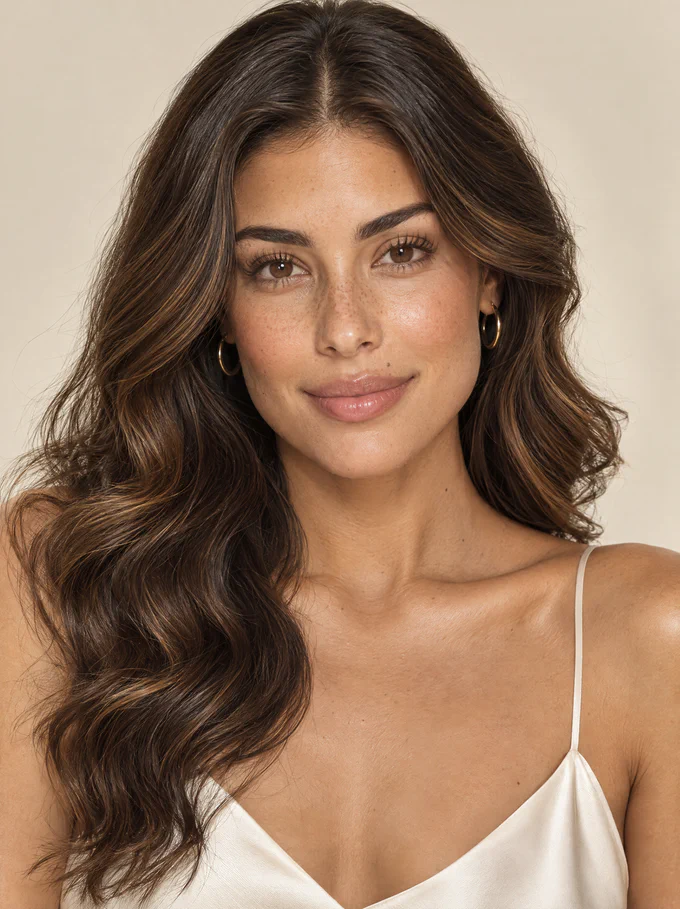
- The hair, at full frame: blowout to air-dried.
What did not change much: the pores. They were already there in the first generation. We want to be straight about that, because it's the opposite of what you'd expect and it changes what this technique is for.
The first pass gets you real skin. The second pass gets you a real moment — less makeup, less styling, a person who looks like she was photographed rather than prepared. That's the thing worth 4.5 credits.
 Try this prompt yourself (opens in a new tab)
Affiliate link — we earn a commission if you subscribe, at no extra cost to you.
What does "realistic" actually look like?
Eyes
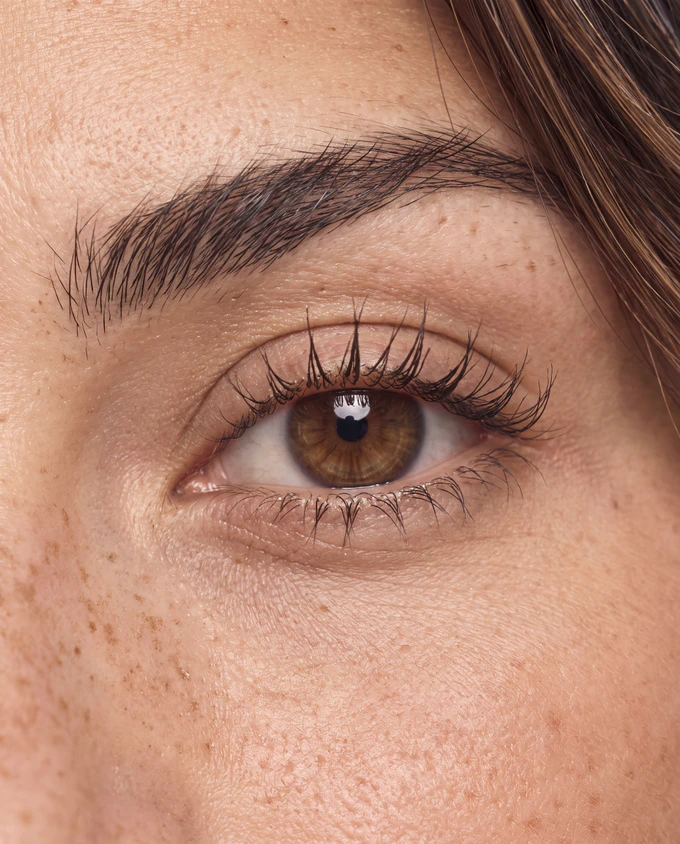
- Individual eyebrow hairs, growing in different directions, not a painted shape
- Lashes separated and unevenly curled, shorter at the inner corner
- One catchlight, in the same place in both eyes
- Fine lines under the lower lid, and a soft shadow in the socket
- Pores visible on the temple and the lid itself
Nose, cheeks and mouth
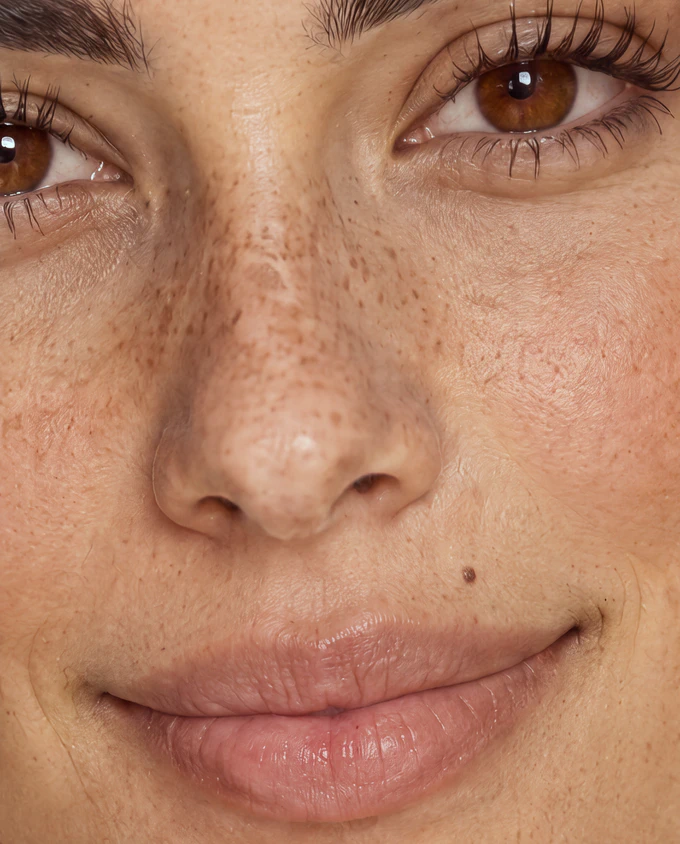
- Freckles of different sizes, denser toward the center, scattered rather than evenly spaced
- Open pores across the nose and inner cheek
- A faint shine on the tip of the nose and the bridge, not an all-over matte
- Slight color variation between cheek and nose, instead of one flat tone
- Vertical lines running through the lip, and a soft edge where lip meets skin
- Lip color that lets the texture show through — the vertical lines are visible under the tint, which is what separates a bare lip from a coated one
- Fine down on the upper lip, catching the light
- A beauty mark, which is exactly the kind of specific thing that makes a face a person
Hairline
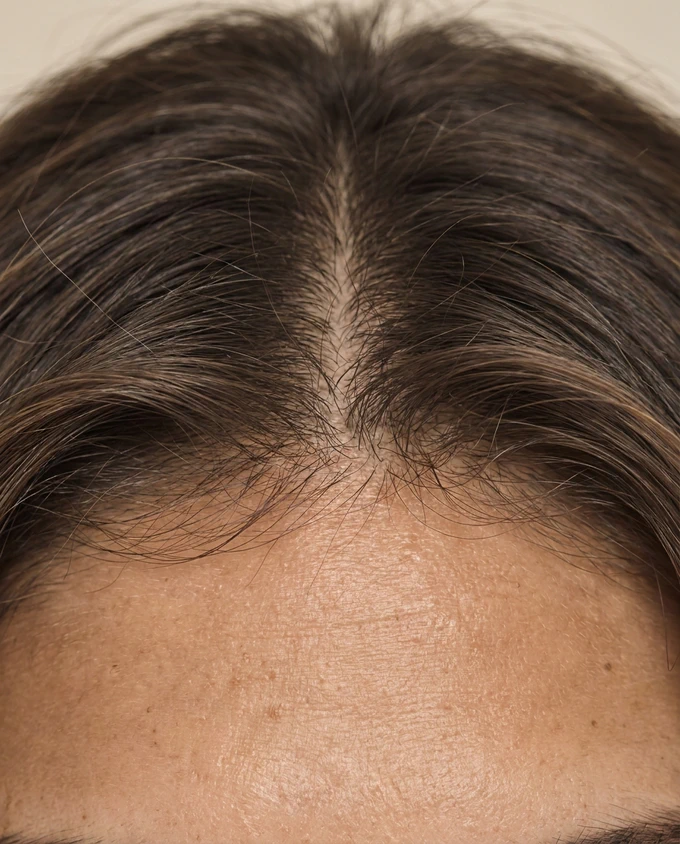
- Individual strands breaking away from the mass, especially at the temple
- Short baby hairs along the hairline, lying in different directions
- Scalp visible at the part, which almost no AI image gets without being asked
- Strands that cross and overlap instead of lying in a single sheet
Neck and collarbone
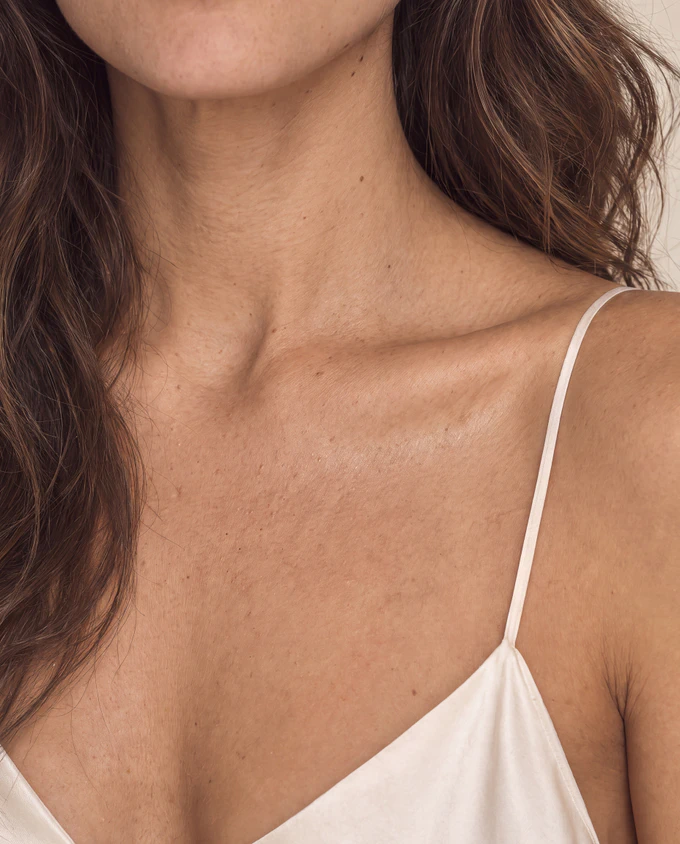
Check this one first. It is the most reliable tell there is, because it's the part nobody prompts for. AI models put their effort into the face and leave everything below the jaw smooth, uniform and younger than the face above it.
- Horizontal creases across the throat
- Small moles, placed irregularly
- Texture continuing off the jaw and down the neck without a seam
- Loose strands of hair falling across the shoulder rather than sitting on top of it
If you take one habit from this page, take this one: when you're judging an AI portrait — yours or anyone else's — look at the neck, the hairline and the lashes before you look at the face. The face is where the model concentrates. The edges are where it gives up.
Can you do it in one prompt?
We tested it, because if it works it halves your cost. We rewrote the first prompt with every polish word replaced by a texture word, and the softbox replaced by a description of what the light does:
PROMPT
...Real skin: visible pores, fine vellus hair catching the light along the jaw and upper cheek, subtle natural unevenness and warmth across the cheeks and nose, a faint shine on the forehead and nose bridge, lightly retouched editorial finish rather than a smoothed one... Minimal makeup: bare skin, no foundation coverage over the freckles, no highlighter, softly defined natural lashes, a bare tinted lip in a muted rose with natural lip texture and fine lip lines... air-dried loose waves with a natural undone texture, clean center part, a few fine flyaway strands catching the light at the crown and temples... Soft daylight coming from the front-left and slightly above eye level, gentle shadow falling down the right side of her face and under her jaw, soft shadow under the nose and lower lip, realistic contrast, neutral natural color, subtle film grain. 85mm lens, shallow depth of field, photorealistic, quiet and understated. Avoid: smoothed or waxy skin, glossy salon blowout, heavy makeup, flat even lighting, orange or sepia color cast.
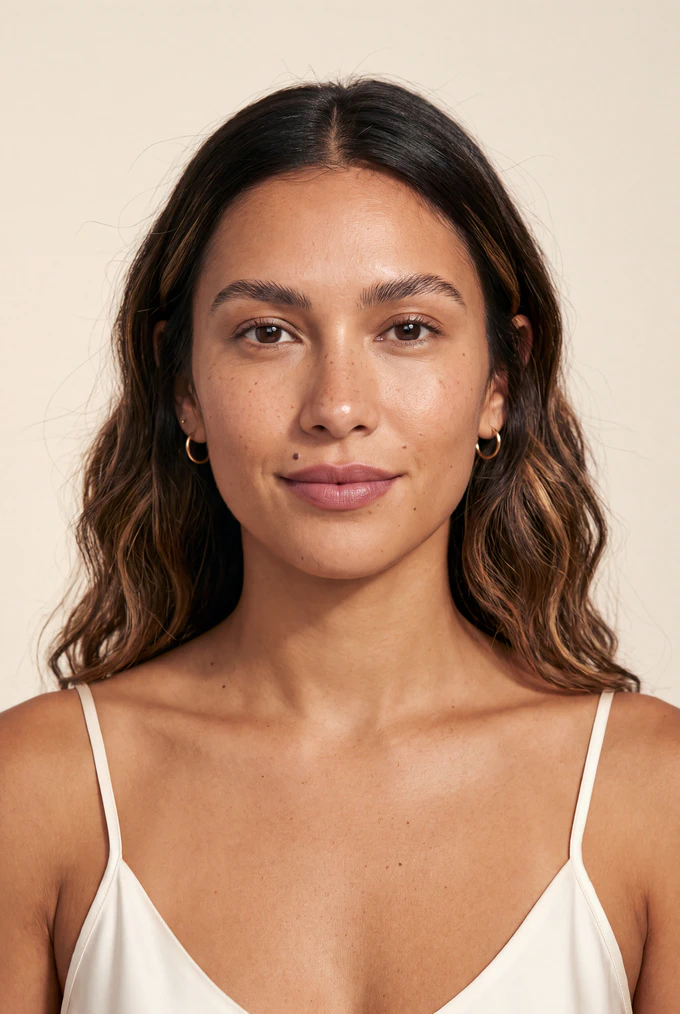
It half worked, and the half that failed is the interesting part.
The skin came out better than either of the other two — visible pores on the forehead and nose, real tonal unevenness, freckles that survived onto the chest. One prompt, genuinely photographic skin.
But the light came back flat. We asked for daylight from the front-left with a shadow down one side, and got even frontal lighting with no modeling at all. And the mood went with it. The first image is a campaign. The second is an editorial portrait. This one is a casting polaroid — clean, honest, slightly clinical. The hair flattened at the crown, the expression cooled, the brows came in heavy.
So the two-pass method isn't two passes because one prompt can't make real skin. It demonstrably can. It's two passes because the first prompt's job is to build the mood and the second one's job is to remove only the plastic. Ask for both at once and the model chooses, and it chooses realism over atmosphere.
Which one you want depends on the job:
- One pass if you need a clean, real-looking face for a profile, a testimonial, a founder photo. Stop at one generation.
- Two passes if the image has to carry a brand — a campaign, a hero shot, anything where mood is the point.
What if your character isn't Mira?
The eight-part structure holds for anyone. You change the description and leave the method alone.
Older faces — the single most underused instruction in AI portraiture. Ask for lines where lines go: at the outer eye, between the brows, from nose to mouth corner. Ask for texture on the backs of the hands and the neck, not only the face. Models smooth older faces by default and you have to insist.
Men — specify stubble density and direction, and ask for visible beard shadow under the jaw. Skin texture instructions matter more, not less; male skin is rendered smoother by default.
Darker skin tones — name the undertone, not just the depth, and ask for specular highlight on the cheekbone and brow rather than flat matte. Many models wash out texture on darker skin at lower resolutions, so the highest setting matters more here, not less.
A character you'll use repeatedly — everything above gets you one good image. Getting the same face again, at a different angle, in a different outfit, is a different technique and a guide of its own. Don't expect a prompt to do it.
Why does your AI person look wrong?
She looks like a mannequin
Smooth, evenly lit, no shadows anywhere, the face sitting flat against the background.
The fix: name a light direction and a shadow. Soft daylight from the front-left, slightly above eye level, gentle shadow falling down the right side of her face and under the jaw. Flat even light is the most common fake tell there is, and most models default to it. You have to ask for shadow explicitly, and you may have to ask twice — our one-prompt test asked and was ignored.
And name what the light does, not the equipment making it. In a tight head-and-shoulders crop there's no room for a light stand to appear. Open the frame up and there is.
The face changed when you edited something else
You asked for a different lip and got a different woman.
The fix: every AI edit redraws every pixel, so list what must stay. Keep her face shape, bone structure, eye color, earrings and the background exactly the same. Our edit prompt locked eight things to change four. If a lock isn't in the prompt, it isn't protected.
And work from the approved image every time, never from an edit of an edit. Each pass drifts a little, and the drift compounds until you're looking at someone else.
The beauty mark moved to the other side
Ours did, in the one-prompt test. We asked for a mark above the left side of her upper lip and got it on the right.
The fix: models read left and right inconsistently — sometimes from the subject's point of view, sometimes from yours. Say which you mean: on the left as you look at the image. Same for which way a face is turned: her nose points toward the left edge of the frame beats turned to the left every time.
She's beautiful and completely forgettable
A face with nothing specific in it. No freckle, no mark, no asymmetry — the average of every attractive face the model has seen.
The fix: give her at least two things you'd mention if you were describing her to someone. A beauty mark in a named place. Freckles across a named area. A gap in the teeth, a scar through an eyebrow, a crooked smile. Specificity is what separates a character from a type, and it's also what makes her recognizable later.
You asked for a close-up and got a different photo shoot
We asked for a close-up of our model's hairline three times. Each time the hair came back restyled — tucked behind the ear once, parted at the side twice. Same woman, same colors, same quality. Different hairdo.
The fix: the words a close-up photograph of the same woman read as take another photo of her, and a new photo gets a new stylist. Open with "This is NOT a new photograph. This is a magnified crop of the reference image — the same photograph, same moment, enlarged", then name what must not change: the hairstyle, the parting, the pose, the head angle, the light.
And if it keeps getting one thing wrong, frame that thing out or lock it down. Our fourth attempt put the word centred in three times and listed a side parting first in the avoid line. That one worked.
You asked for 'not X' and got X
Long lists of things to avoid tend to produce the things on the list.
The fix: describe what you want, positively, and keep negatives to one short line at the end if you use them at all. A bare tinted lip with natural texture works. Not glossy, not shiny, no gloss often doesn't.
The same trap with technical instructions: no frizz is an instruction to draw a wig. A few fine flyaway strands at the crown is what you actually meant.
What else do people ask about AI portraits?
How much does it cost to make an AI model?
Our two generations came to 8.5 credits: 4 for the first at 4K, 4.5 for the edit. That's one finished portrait. Costs vary by tool, model and resolution, and higher resolutions cost more — which is money worth spending when there's a face in the frame.
Do I have to say the person is AI-generated?
We label every image we publish, and platforms increasingly require it. Rules vary by country and platform, so check what applies to you. Our own rule is simpler than any regulation: if someone would feel misled seeing it, say so. A face is the thing people are most entitled to know about.
Can I use an AI model in my brand's advertising?
In many places yes, with disclosure, but advertising rules differ by country and by platform and some sectors have extra restrictions. Check before you run paid media. The safer habit is to disclose clearly and never imply the person is a real customer giving a real testimonial.
Why does my AI person still look fake with a good prompt?
Look at the light before anything else. If you can't point at where it's coming from, that's your problem, and no amount of skin detail will fix it. After that, look for styling with no wear: perfect hair, perfect lip, a highlight exactly where a makeup artist would put one.
Can I get the same face again in a different photo?
Not reliably from a prompt alone. Running the same text twice gives you a similar type, not the same person, and small changes to the wording move the face more than you'd expect. Keeping one character consistent across many images is a separate technique, and the subject of a future guide.
Should I use a real person's photo as a reference?
Not without their written permission, and never to generate a character you'll present as someone else. Beyond the legal problem, it's the fastest way to make something you can't use. Everything on this page was made from words alone, which is why it belongs to us.
What resolution should I generate at?
The highest available, every time there's a person in the frame. The detail that makes skin read as photographic is only a few pixels wide and the first thing a lower setting discards. Generating large once is also cheaper than generating small and upscaling afterwards.
Get PromptWise (opens in a new tab)
Affiliate link — we earn a commission if you subscribe, at no extra cost to you.
What should you make next?
Last updated